

The SurveillX platform

From field signal to operational action.

Capture the scene, add environmental and system context, preserve the best evidence, and put the whole field into the hands of operators, software, and governed AI agents.

Capability map

One platform. Eleven connected layers.

Core capabilities ship broadly. Hardware and third-party paths marked “deployment-specific” require the relevant device, credentials, or configuration.

01 / RECORD

Continuous capture at the edge.

SurveillX records directly where the cameras are. The stream pipeline segments H.264 and H.265 video locally, monitors continuity, and recovers from the unstable camera and storage conditions that make remote deployments difficult.

Multi-source ingestNetwork RTSP, ONVIF-managed IP cameras, and deployment-specific CSI or USB sources behind one camera model.Available
Recording resilienceSegmented archive, exponential reconnect, gap detection, source recovery, and health telemetry per stream.Available
Storage protectionAdaptive disk reserve, asynchronous trash cleanup, and optional RAM spool flushing isolate recording from NVMe stalls.Available
Retention policyGlobal or per-stream retention, protected evidence exemptions, and cloud-aware cleanup behavior.Available
Pre-roll contextCompressed frame buffering retains the moments before an event so alerts do not begin after the action.Available
Camera hierarchyCamera → head → stream mapping follows multi-sensor and multi-rendition reality instead of flattening every feed.Available
02 / LIVE

Responsive live view across changing links.

The default live path delivers each camera as its own sub-second stream over Media over QUIC (WebTransport)—a next-generation transport built for lossy cellular links that scales to many viewers without multiplying the site uplink. WebRTC composited sessions, cloud fan-out, adaptive HLS, and a snapshot grid cover every other condition.
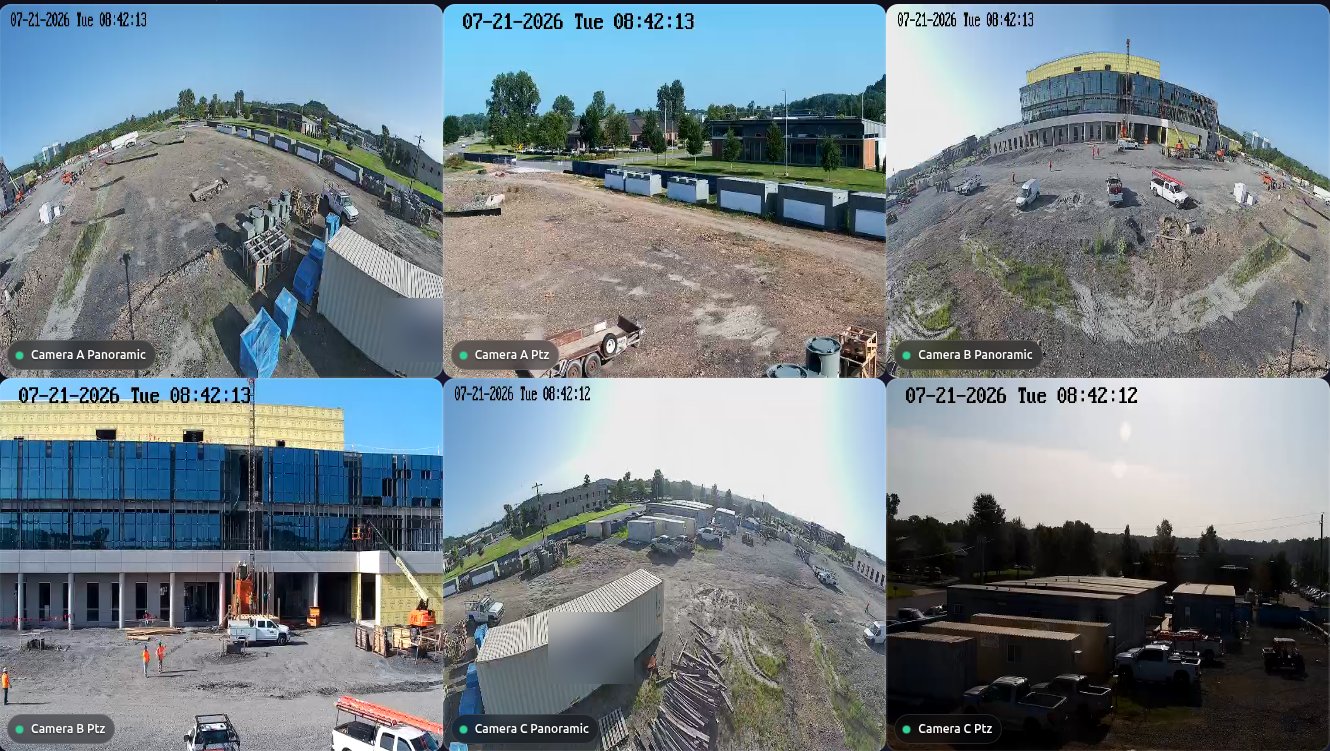
Per-camera live tilesSub-second per-camera streams over Media over QUIC with relay fan-out—the fleet-default live path for browser viewing.Available
Embedded WHEPIn-process WebRTC delivery for composited multi-camera sessions and click-to-zoom without a local media proxy.Available
GPU compositorTile, spotlight, picture-in-picture, crop, alpha, and click-to-zoom views composed on the Jetson GPU.Available
Cloud SFU publishWHIP by default, with SRT available for configured cellular paths where retransmission behavior is preferable.Deployment-specific
Adaptive HLSMulti-variant playlists, conservative cellular startup, bandwidth probing, and playback telemetry.Available
Snapshot gridA single composed JPEG or presence-driven push feed provides a low-cost awareness mode for every camera.Available
Codec controlH.264 broadly, with H.265 live session support gated to compatible clients and deployment profiles.Deployment-specific
Live multi-camera grid: six sub-second per-camera tiles from a construction site with camera labels, live indicators, and synchronized timestamps
03 / AI

Detect locally. Analyze deliberately.

Edge inference handles the continuous work; higher-level vision analysis is invoked when a human or scheduled workflow needs an explanation or comparison. That keeps the system useful offline and applies model cost where it creates an answer.

Object detectionDeepStream + TensorRT inference for people, vehicles, tracking, and custom model deployments.Available
Regions of interestLive-updatable include/exclude polygons focus detection on the areas that matter.Available
Snapshot analysisOn-demand natural-language analysis through Anthropic or OpenAI-compatible vision providers.Available
Change comparisonCompare two points in time for construction progress, scene change, inventory, or site readiness.Available
Scheduled reportsMorning/evening comparison and configured site-report workflows run through the persistent scheduler.Configured workflow
Rule-driven analyticsDuration, clear, cooldown, severity, scheduling, and tripwire behavior through the separately deployed Cognia stack.Cognia-configured
04 / INTELLIGENCE

Turn activity into searchable, cited answers.

Panoptic builds a customer-scoped intelligence record from activity windows, events, and selected images. On Cognia-configured sites, learned baselines, anomaly signals, novelty selection, and coverage semantics add richer evidence without replacing the source archive.

Hybrid searchRetrieve summaries, images, and events by caption meaning, activity context, and native visual similarity.Panoptic-connected
Evidence-grounded AskRoute natural-language questions to quantitative analysis, evidence answers, activity intensity, visual progress, or bounded frame pull.Authorized access
Claim verificationReturn supported, partially supported, not supported, or insufficient-evidence verdicts with confidence, citations, and uncertainties.Panoptic-connected
Activity baselinesCompare fifteen-minute activity windows with learned hour-of-week behavior after a warm-up period.Cognia-configured
Coverage-aware truthDistinguish activity, observed-empty time, and unknown/offline periods instead of interpreting missing camera data as quiet.Cognia-configured
Grounded reportsDaily, weekly, and custom-window reports combine structured metrics, events, selected visual evidence, site context, and coverage.Panoptic-connected
05 / EVIDENCE

Move from alert to proof.

Every investigation begins with time. SurveillX indexes the recording archive so teams can jump to a day, event, range, or frame, then protect and export exactly what the incident requires.
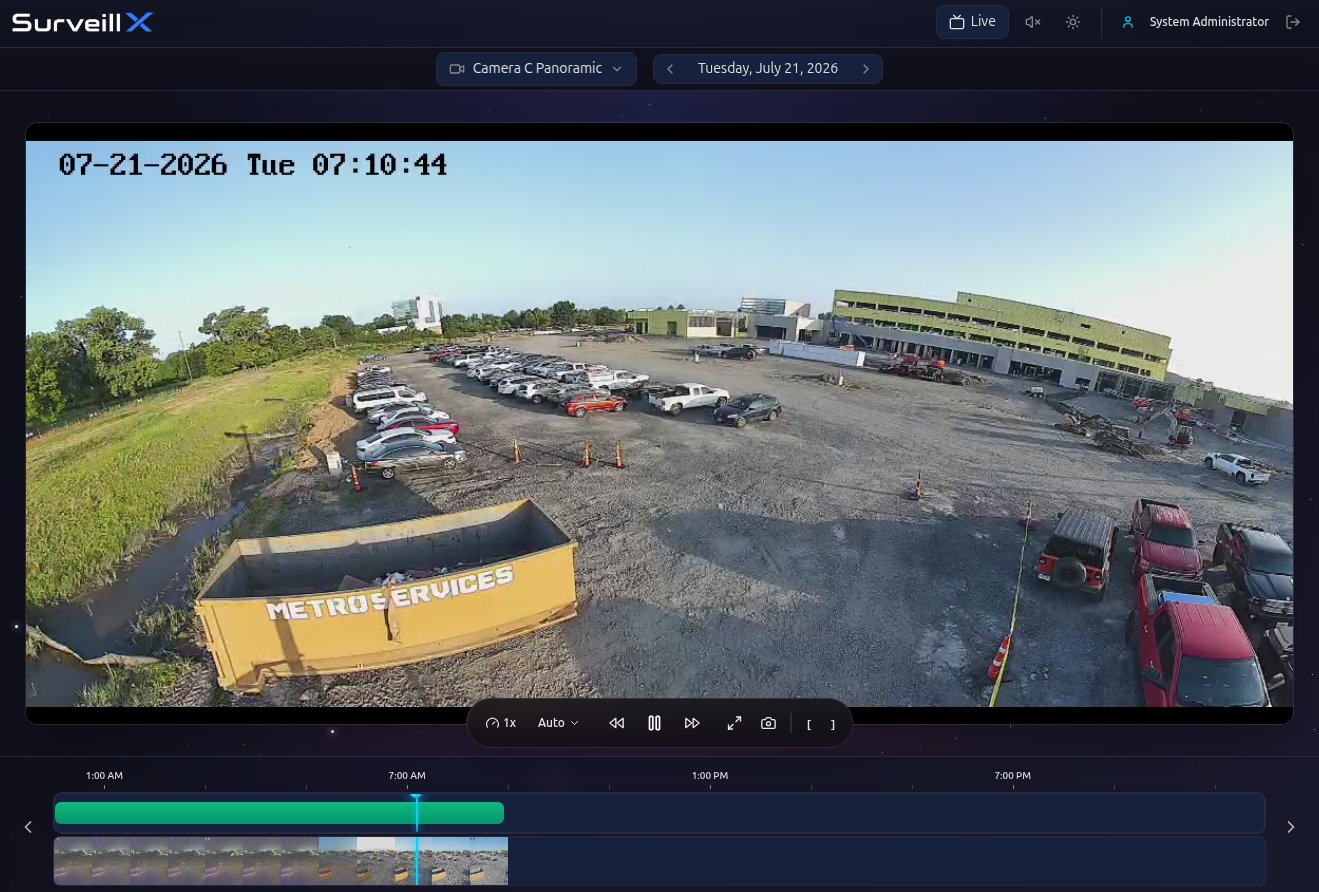
Indexed timelinePre-built recording ranges and day calendars avoid expensive full-archive scans during review.Available
Event mediaEvent markers, nearest frames, thumbnails, bounding-box context, and event-linked clips.Available
Clip exportBounded arbitrary time-range export in MP4 or transport-stream format for external review.Available
Sealed evidence export (ONVIF OEFF)Export a clip as a sealed ONVIF Export File Format artifact—whole-file RSA-PSS seal and a dedicated per-trailer exporter identity—verifiable in an independent, standards-based ONVIF reader. OEFF is the format NIST recommended as the FBI’s minimum interoperability requirement (NISTIR 8161r1) and IEC standardized (62676-2-32). Seals the exported file; not a certified chain of custody.Canary
Evidence protectionSingle or bulk protection flags exempt selected segments and timelapse frames from retention cleanup.Available
Integrity checksOptional per-segment SHA-256 generation and background validation for local file integrity.Optional
Secure sharingCapture or select a local asset, upload it, and issue a time-limited signed cloud URL.Cloud-configured
Playback view: recorded video with a 24-hour timeline showing the recorded range, a draggable playhead, thumbnail filmstrip, and controls for speed, quality, snapshot, and clip export
06 / FIELD CONTEXT

Know what surrounded the frame.

Power, weather, light, location, sensor state, and connectivity often explain the event as much as the pixels do. SurveillX brings these signals onto the same edge node and exposes them through one operational surface.

Location + lightNMEA, router, tower, IP, or manual location with solar position and day/twilight/night classification.Available
WeatherGPS-located forecast plus direct SenseCAP ONE weather station readings on equipped sites.Hardware/credentials
LoRaWANChirpStack ingest, device state, stored events, and threshold alerts; device validation is performed per deployment.Hub + devices
PowerVictron GX telemetry for battery state of charge, solar, voltage, current, and DC/AC load.Hardware-specific
CellularPeplink WAN, carrier, band, RSRP/RSRQ/SINR, cell identifiers, clients, and uptime.Router-specific
Physical I/ODigital inputs, relay outputs, bitmask operations, configurable pin mappings, and pulse actions.Enabled per node
07 / CONTROL

Operate cameras and the physical site.

SurveillX extends beyond passive viewing with deep camera onboarding, PTZ automation, live audio, and optional digital I/O. These controls let one edge platform coordinate what the site sees, says, and triggers.

Camera discoveryONVIF WS-Discovery, Hikvision SADP, SSDP, ARP/OUI, and network probing help find and onboard devices.Available
Vendor-native controlHikvision ISAPI, Axis VAPIX, Hanwha SunAPI, and i-PRO surfaces reach deep camera settings beyond ONVIF, plus ONVIF Profile G on-camera recordings.Available
Full PTZ movementContinuous, relative, and absolute moves, stop controls, status, presets, home position, and WebSocket control.Available
PTZ automationIdle return, preset tours, pattern record/replay, and scheduled positions for repeatable coverage.Available
PTZ guardrailsPer-head locks and configured privacy/no-go regions prevent unauthorized or prohibited movement.Available
Audio talk-downTTS announcements, pre-recorded clips, and live operator voice to site speakers or camera speakers, with priority queueing.Speaker-equipped
Relay + trigger controlOptional GPIO inputs, outputs, simultaneous bitmask changes, pulses, and configurable active-low logic.Hardware-enabled
08 / TIMELAPSE

Compress a changing site into a useful story.

Timelapse is a first-class archive, not an afterthought. Capture policy can follow time and available light, while frames remain searchable, protectable, shareable, and available for configured AI comparison.

Scheduled capturePer-camera intervals, time windows, resolution, quality, and light-phase filters.Available
GPU frame pipelineHardware-aware frame capture and JPEG encoding reuse the edge media pipeline efficiently.Available
Frame archiveIndexed frames, day calendars, thumbnails, light tags, protection flags, and cloud-upload state.Available
Video generationCreate time-compressed output from selected cameras and time ranges through managed jobs.Available
Change analysisCompare selected frames with a configured vision provider for progress or scene-change summaries.Available
Construction deliveryUpload periodic or event-driven images into Procore photo albums; broader Procore records are outside current scope.Credentials required
09 / FLEET

Operate the infrastructure remotely.

Distributed field systems need more than a camera list. SurveillX exposes the state of the application, recorder, storage, GPU, networking, power, tunnels, and deployments so operations teams can diagnose before they dispatch.

Fleet heartbeatCamera, storage, location, hardware, and service state continuously reported to the cloud control plane.Available
System telemetryCPU/GPU load, thermals, power, memory, process, NVMe health, filesystem, and network diagnostics.Available
Service healthPer-service attempt, failure, last-success, and error telemetry from long-running workers.Available
Remote deploymentDigest-addressed, compatibility-gated deploys with self-test, history, and rollback controls.Available
Scheduled operationsCron, interval, and solar-relative tasks with execution history and action audit.Available
Secure access pathCloud heartbeat, authenticated API access, and managed reverse-tunnel connectivity for field nodes.Available
10 / AGENTS

Give AI tools, context, and guardrails.

Model Context Protocol turns the fleet API into a language-compatible operational surface. An assistant can gather evidence across systems, summarize findings, and propose or execute permitted actions without hiding the underlying data.

Broad tool surfaceCameras, streams, events, timelapse, PTZ, cloud, hardware, metrics, tasks, filesystem, and deployment operations.Available
Fleet fan-outRun the same health or evidence question across multiple edge nodes and compare structured results.Available
Operational contextFleet configuration, API contracts, database schema, and tool metadata help assistants choose the right path.Available
Safety controlsConfirmation gates, filesystem sandboxing, SQL restrictions, scopes, and bounded output protect sensitive actions.Available
AI-assisted investigationCombine health, recordings, events, snapshots, sensors, and logs into an evidence-backed explanation.Available
Autonomous fleet healthInternal cloud operations agent evaluates fleet health and performs policy-bounded remediation.Internal operations
11 / INTEGRATE

Fit into the systems around the site.

SurveillX is designed as a field intelligence layer—not a closed camera island. Its REST API, signed events, camera protocols, alarm transports, cloud backends, and construction workflows connect evidence to existing operations.

REST + OpenAPI367 documented route patterns and 500+ operations across the complete edge feature surface.Available
Signed webhooksHMAC-authenticated event delivery with retry controls and bounded queues.Available
Camera ecosystemONVIF plus Hikvision ISAPI/SADP, Axis VAPIX, Hanwha Sunapi, and i-PRO integrations.Available
Alarm deliverySIA DC-09 and Immix SMTP paths connect configured events to central monitoring workflows.Station-configured
Cloud storageAzure Blob, Amazon S3, and S3-compatible storage with per-stream policy and bandwidth throttling.Credentials required
Procore photosPeriodic snapshots and event images uploaded into project photo albums.Photo workflow only

Architecture

Keep the hot path local. Connect everything else deliberately.

Explore the architecture
Field inputs

Scene + state

  • RTSP / ONVIF cameras
  • CSI + USB cameras
  • GPS + weather
  • LoRaWAN + digital I/O
  • Power + cellular
Continuum + configured Cognia edge

Record · learn · index · act

  • GStreamer / DeepStream / TensorRT
  • Multi-database local timeline
  • Optional activity learning + selection
  • Health, retention, and schedulers
  • REST, WebSocket, and MCP tools
Connected operations

People + systems

  • Prism operator experience
  • Panoptic search + reports
  • Azure / S3 backup
  • Webhooks + alarm stations
  • AI assistants + fleet agents

Common questions

Platform, plainly.

No. Core recording, retention, local live view, native object detection, health monitoring, and many site actions run on the edge. Connected services add remote access, backup, fleet aggregation, external notifications, and model-backed analysis.

Yes. SurveillX supports standard RTSP and ONVIF IP cameras, including deeper integrations for several major vendors. CSI and USB cameras are also supported on compatible edge hardware. Exact camera and PTZ behavior is validated during deployment design.

No. Weather stations, LoRaWAN devices, Victron systems, Peplink routers, and GPIO require the corresponding hardware and configuration. SurveillX exposes a common operational model, while each physical deployment is validated against its equipment.

No. Optional SHA-256 hashes and protection flags support file-integrity and retention workflows, but they are not presented as a certified immutable chain-of-custody system. Formal evidentiary requirements should be scoped separately.

Design the deployment

Start with the site, not a SKU sheet.

We’ll map the field conditions, evidence goals, operator workflows, cameras, sensors, and integrations into a deployment that can be tested.